King IPTV Review 2026: Is It Worth It for US Cord-Cutters?
Published March 2026 · 18 min read
I'll be real with you, I spent $180 last month on cable. One hundred and eighty dollars. For channels I rotate between maybe a dozen of, on a good week.
So when my coworker Marcus showed up to our Friday lunch talking about watching every NBA game, live NFL matchups, and still catching up on HBO shows for under $17 a month, I genuinely thought he was exaggerating.
He wasn't. He was using King IPTV.
I went home that weekend, did my homework, ran an IPTV trial for King IPTV, and here's everything I found, the good, the frustrating, and the stuff you actually need to know before handing over your credit card.
Let's check the Honest King IPTV review after the test.
What Exactly Is King IPTV?
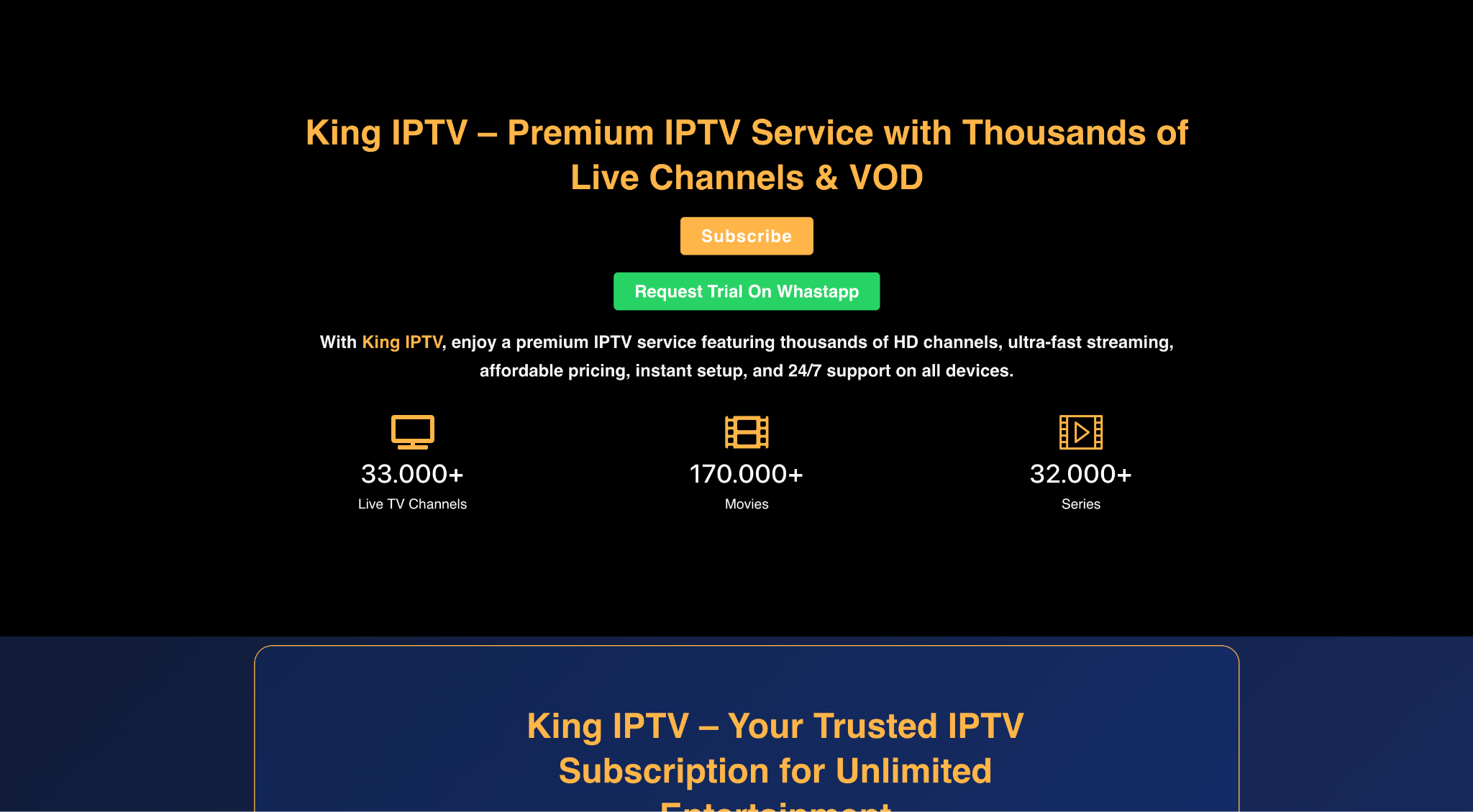
King IPTV is an Internet Protocol Television (IPTV) service. Translation: instead of a cable box or satellite dish pulling in your channels the old-fashioned way, everything streams over your internet connection. Same idea as Netflix or Hulu, except instead of on-demand only, you get live TV, sports, news, local channels, the whole deal. If you're brand new to this world, this guide to what IPTV actually is is worth a quick read before going further.
King IPTV specifically markets itself around a massive channel lineup. We're talking 17,000+ live channels covering the US, UK, Canada, Latin America, and international content from dozens of countries. Add to that a giant on-demand library, and you've basically got a cable replacement plus a streaming service rolled into one monthly fee.
The official site is King IPTV, and plans run anywhere from around $17/month to $55 for a full year.
Setting It Up: My Actual Experience with King IPTV
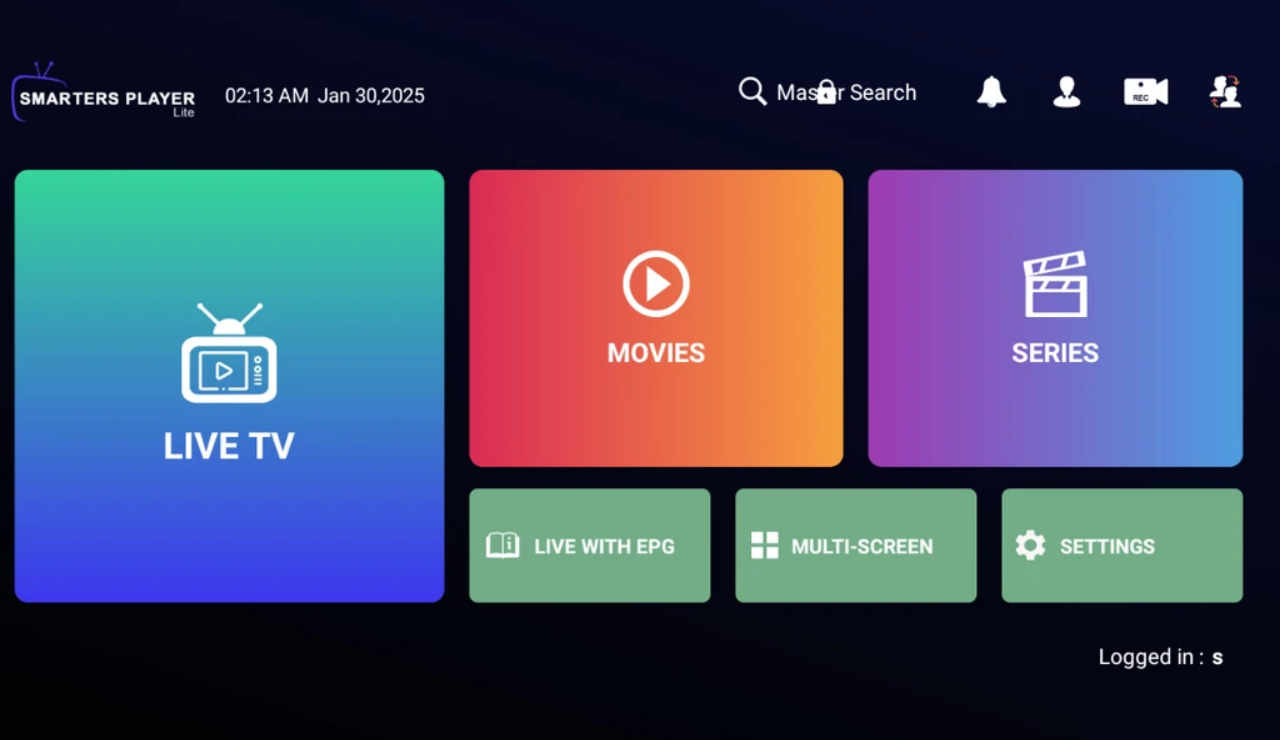
I started with the $2 24-hour trial, enough time to really stress-test it. Setting up on my Amazon Fire TV Stick took maybe 10 minutes total. Download the app IPTV Smarters Players, punch in the login credentials they email you, and boom, you're looking at a channel guide that honestly resembles something out of a sci-fi movie where everyone has infinite TV.
The interface itself is clean. There's an Electronic Program Guide (EPG) that works like a traditional cable guide, which I appreciated; some IPTV services skip this, and finding content without it is a nightmare. Live Channels are sorted by category: Sports, News, Entertainment, Kids, International, and more.
My first move was pulling up ESPN for a live college basketball game. It loaded in about 4 seconds, streamed in HD, and held steady for the entire first half before I started poking around at everything else.
What's Actually Good About King IPTV
The channel variety is genuinely wild. I found local ABC, NBC, CBS, and Fox affiliates, which matters if you're cutting cable but still want to watch the evening news or local weather. There's ESPN, FS1, NFL Network, NBA TV, and beIN Sports for the sports junkies. For US Spanish speakers, there's a strong Univision and Telemundo presence, plus dedicated Latino packages, a significant gap that many IPTV competitors miss entirely. You can get a sense of the full IPTV channel range available to understand just how wide the net goes.
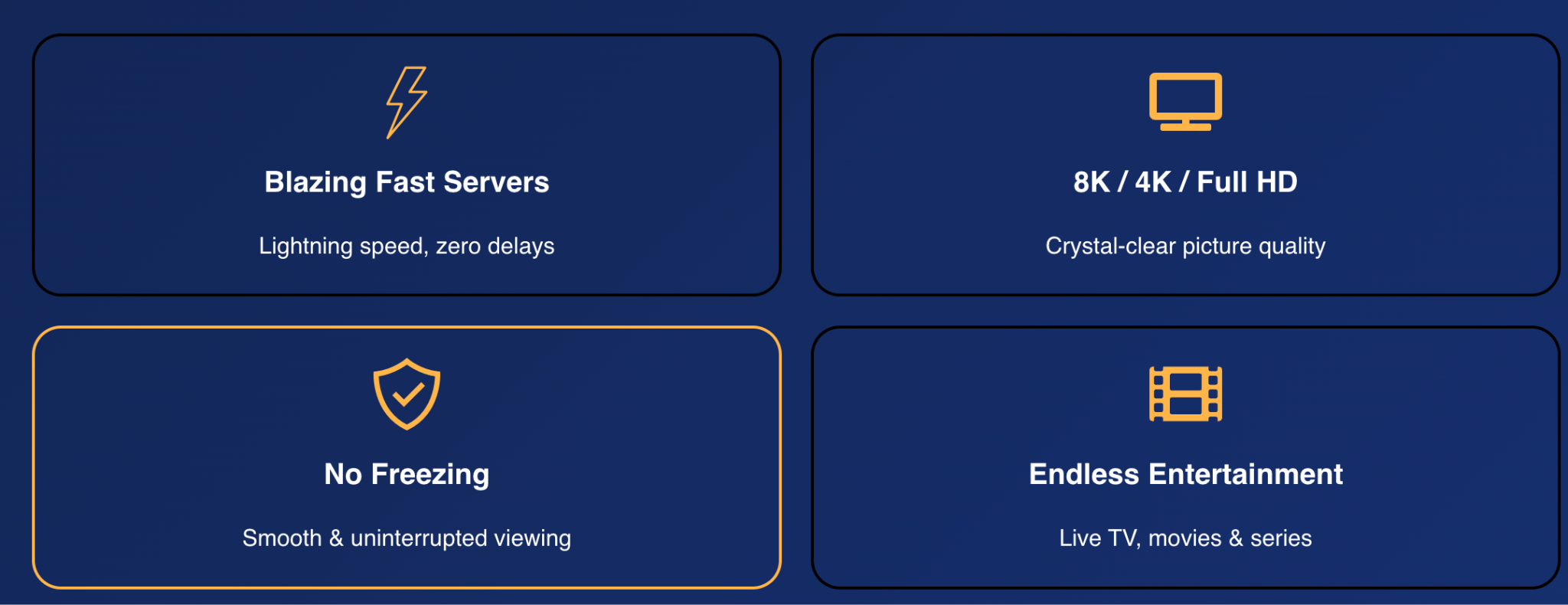
The VOD library is deep. I pulled up Oppenheimer, a couple of recent Paramount+ originals, and about 15 minutes of a Korean drama my wife picked — all without buffering. It's not Netflix-polished with fancy UI recommendations, but the selection is genuinely impressive. If you're specifically chasing 4K IPTV streaming quality, King delivers on that front for most major titles.
Pricing is aggressive. Here's the breakdown at a glance, and if you want to compare how King's pricing stacks up against the broader IPTV subscription market, that's worth a look too:
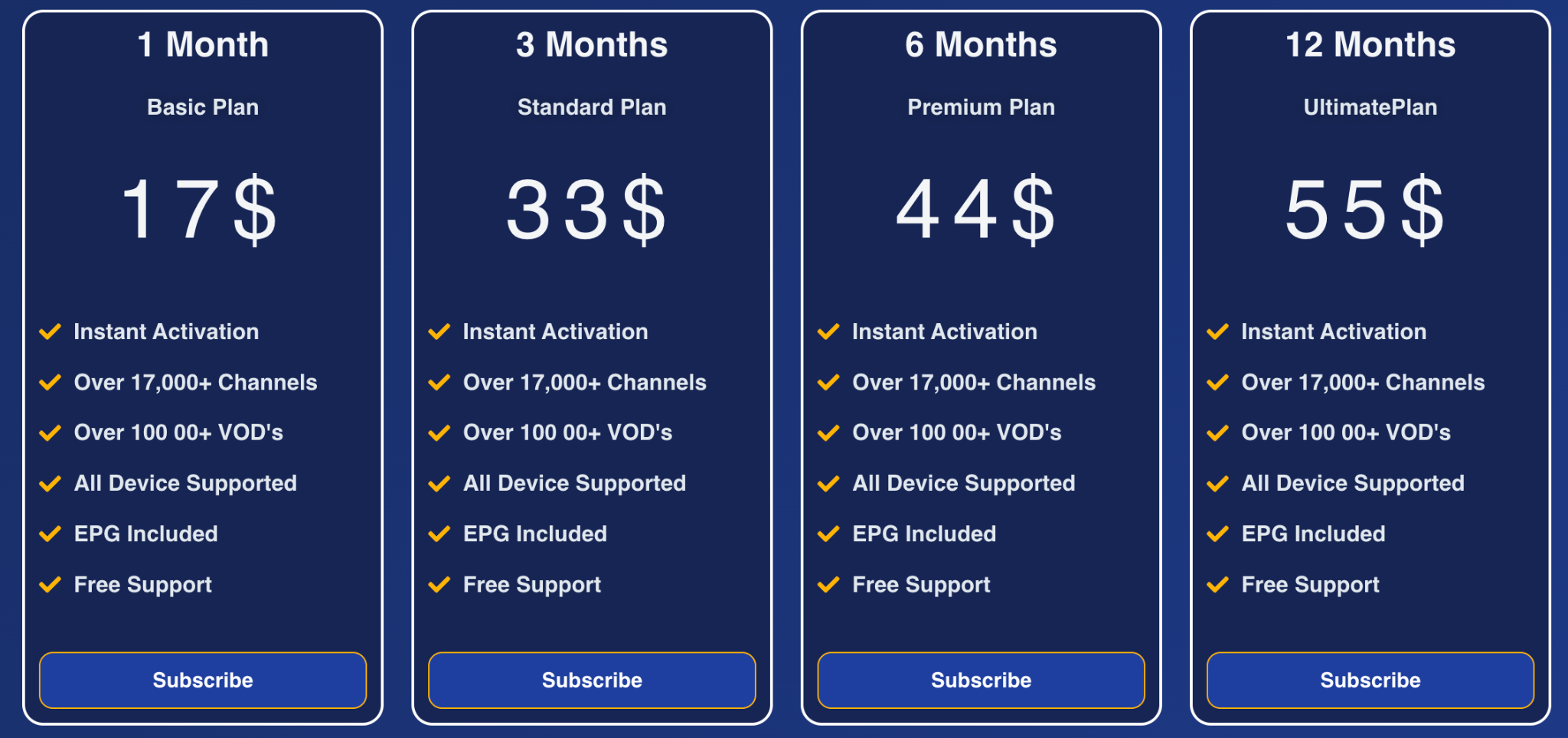
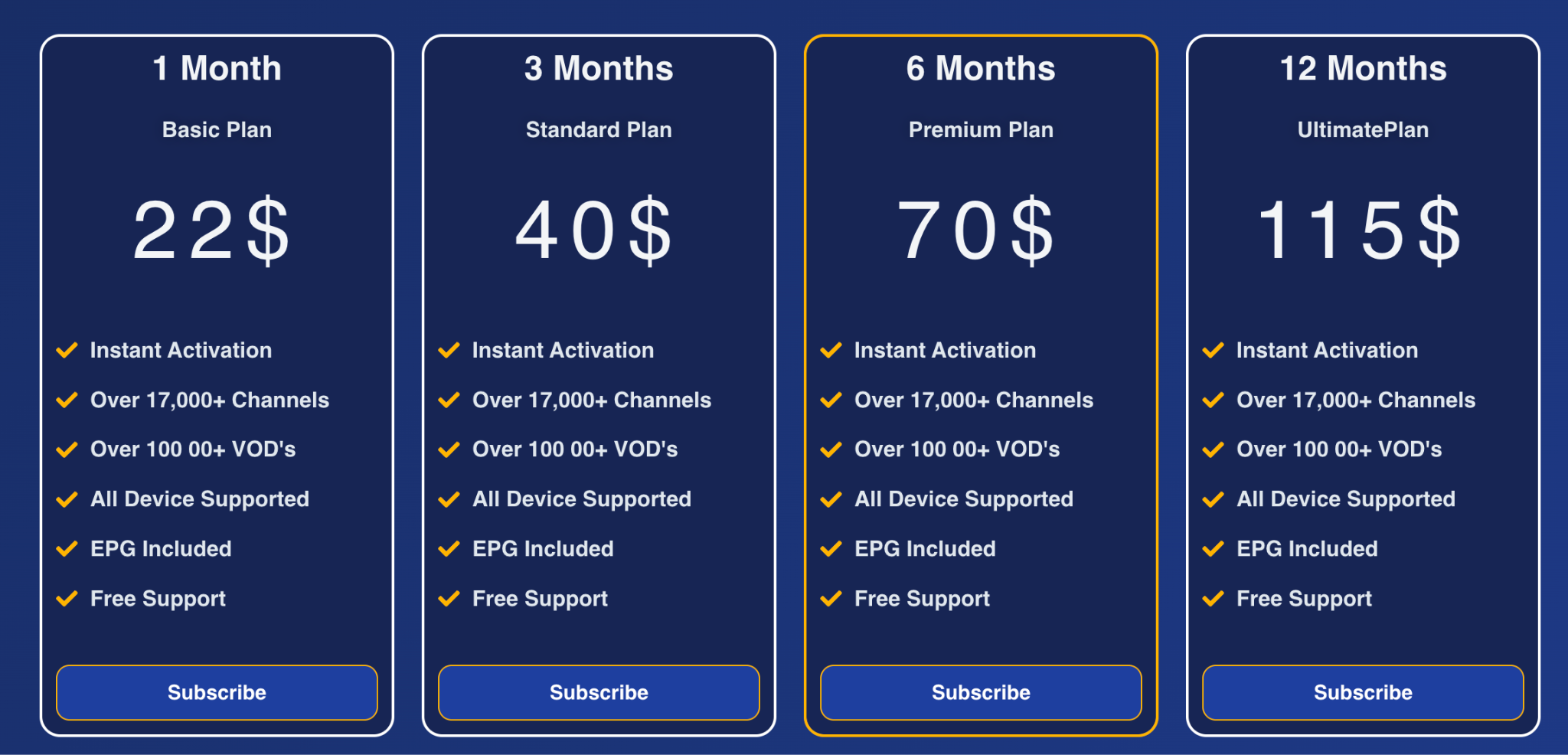
Multi-device plans (up to 2 connections) are available at higher tiers. Even the monthly plan beats my old cable bill by a factor of ten.
Customer support actually responded. I hit a small issue where the EPG stopped loading correctly on day two of my trial. WhatsApp chat. Twenty-two minutes later, a rep walked me through a fix. Having dealt with my cable company's hold times, this felt miraculous.
The Stuff That Gave Me Pause With King IPTV
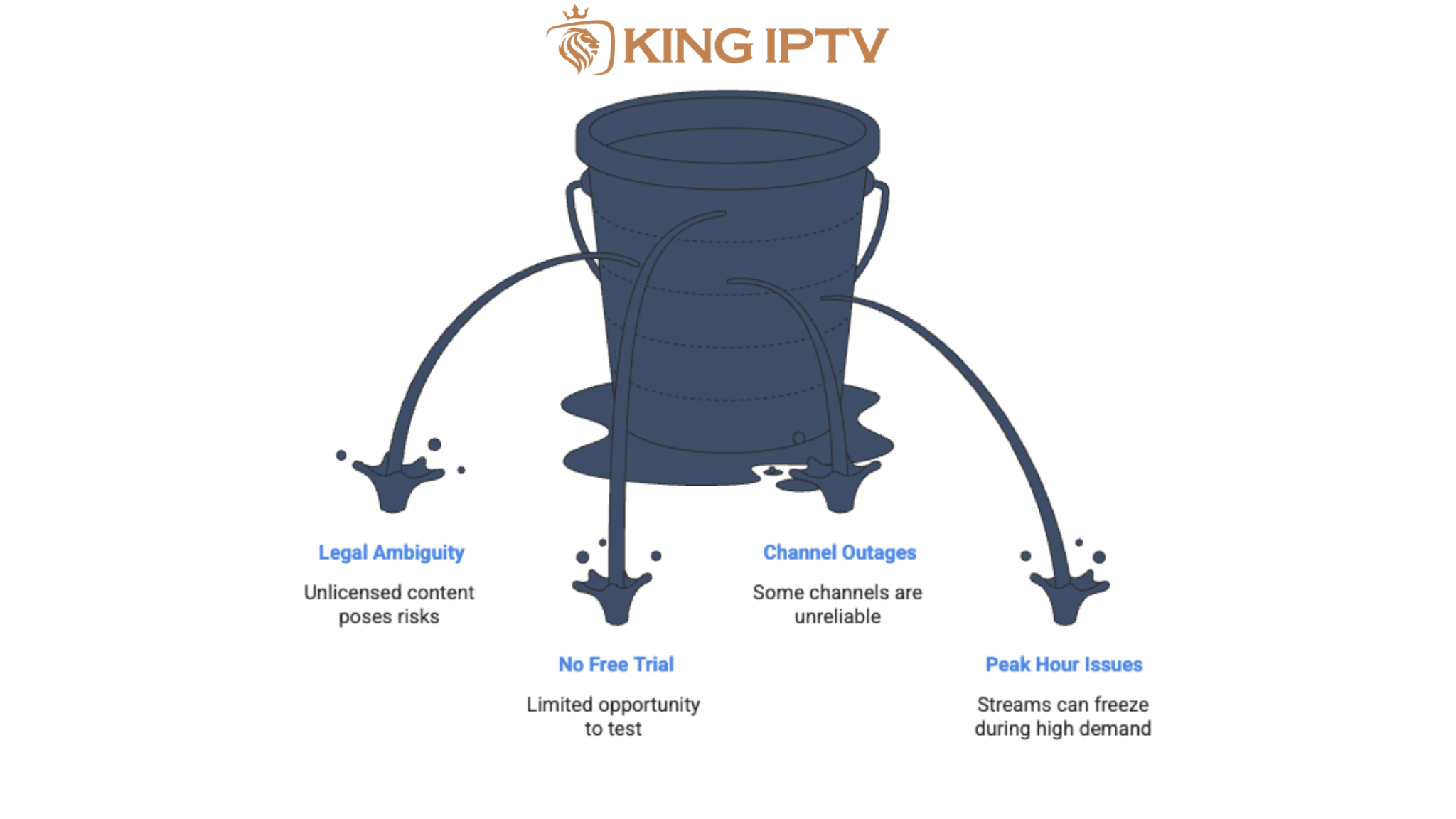
Here's where I'll be more blunt than most reviews you'll find.
The legal situation is murky
IPTV services like King operate in a legal gray zone. They don't publish licensing agreements, and some content, especially live sports, almost certainly isn't properly licensed. Using the service isn't illegal in itself, but streaming unlicensed content could expose you to risk. My strong recommendation: use a VPN. NordVPN and ExpressVPN both work well with IPTV services and prevent your ISP from throttling your connection or flagging your activity.
No free trial
The $2 for 24 hours is cheap, but it's not free. Some competitors offer a genuine no-cost trial period. Not a dealbreaker, but worth noting.
A handful of channels were offline
Out of 17,000+ channels, maybe 30 or 40 I tried to access showed an error. Mostly obscure regional stuff. Major US networks and sports channels were reliable throughout.
Peak hours can get bumpy
I deliberately tested it during the Sunday NFL slate, multiple major games simultaneously. Streams held up fine on most live tv channels, but two had brief freeze-frames around the 3 pm ET kickoffs. Frustrating if you're right in the middle of a fourth-quarter drive. This isn't unique to King IPTV; it's a known challenge across IPTV services during high-demand windows.
How Does King IPTV Work on Different Devices?
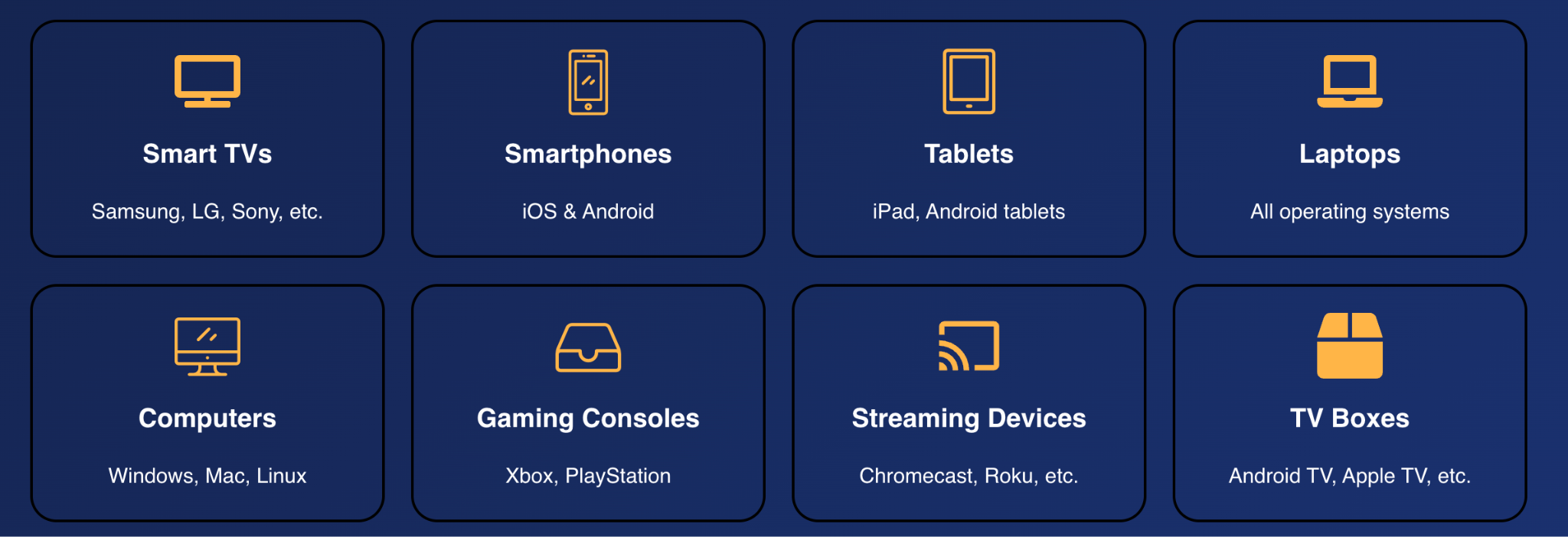
I tested it on three different setups over a week:
My Amazon Firestick was the smoothest experience, the app felt native, and the remote navigation worked naturally. My Android phone ran it well for mobile watching; caught a Yankees game on my lunch break without a hiccup. My LG Smart TV required a bit more setup through a third-party player (I used TiviMate, which I'd recommend for any Smart TV IPTV setup), but once configured, it worked great.
It also supports IPTV on iPhone and iOS devices, MAG boxes, and Windows/Mac computers. If you've got a household with mixed devices, the multi-connection plans cover you.
King IPTV vs. The Alternatives
Even if King IPTV works great for you, you should know what else exists. The IPTV market is competitive, and depending on your priorities, one of these alternatives might actually be a better fit.
IPTV Smarters Pro / TiviMate
These are technically IPTV players, not services. You need to pair them with a provider. But they're worth mentioning because King IPTV is compatible with both, and TiviMate in particular dramatically improves the interface experience. Here's a deeper look at the best IPTV players available if you want to compare options.
IPTVTHEFOX.COM
Similar channel counts, comparable pricing. The VOD organization is arguably better than King's, but the live sports reliability slightly lagged in my limited testing. Worth trying a trial if King doesn't click with you.
YouTube TV
The big, legit alternative at $72.99/month. Fully licensed, excellent DVR, no legal ambiguity whatsoever. If you want absolute peace of mind and a polished experience, this is your answer — you're just paying five times more for it. We've also rounded up the best YouTube TV alternatives if you want a broader comparison.
Hulu + Live TV
$82.99/month with Live TV. Similar licensing clarity to YouTube TV, but includes the full Hulu on-demand library and ESPN+. Again, premium price for premium legitimacy.
Philo
$25/month for 70+ live channels, no sports networks. If you don't care about sports and just want entertainment and lifestyle channels, this is the cheapest legitimate option out there. Curious whether free IPTV is actually worth it? That's a rabbit hole worth going down before you decide.
FuboTV
Built specifically around sports. 200+ channels, excellent for soccer fans (Champions League, La Liga, etc.) at around $79.99/month. Expensive, but sports streaming via IPTV coverage is exceptional.
The honest summary: King IPTV dramatically undercuts the legitimate services on price. The tradeoff is the legal gray area and occasional reliability hiccups. Only you can decide where your priorities sit.
Is King IPTV Worth It in 2026?
For a US cord-cutter who wants broad channel access, live sports, and on-demand content without paying $80/month? Yeah, it's genuinely compelling.
The $15/month entry point is hard to argue with, the channel variety beats anything in that price range, and the streaming quality on a solid internet connection (aim for at least 25 Mbps for HD) is legitimately good.
Just go in with open eyes. Use a VPN. Don't expect a 100% uptime guarantee. And if you have specific content you absolutely cannot miss, a playoff game, a season finale, keep a backup plan within reach.
My personal take: I canceled one of my three streaming subscriptions after my King IPTV trial and haven't looked back. Whether you do the same is a decision only your wallet and your risk tolerance can make.
Quick Tips Before You Start

How to Set Up King IPTV on a Firestick (Step-by-Step)
This is the most common setup I get asked about, so let me walk you through it exactly the way I did it. The whole thing should take you under 15 minutes, even if you've never sideloaded an app before.
Step 1: Enable Apps from Unknown Sources
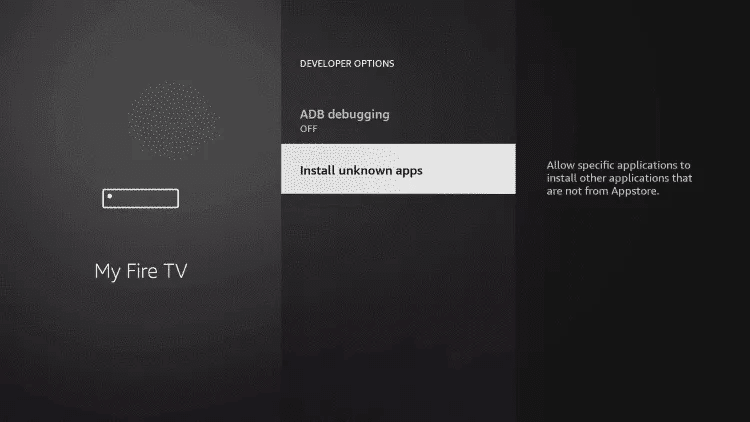
Your Firestick blocks third-party apps by default. You need to turn that off first. Go to Settings → My Fire TV → Developer Options, then toggle Apps from Unknown Sources to ON. It'll throw a warning at you, just hit "Turn On" and keep moving.
Step 2: Download the Downloader App
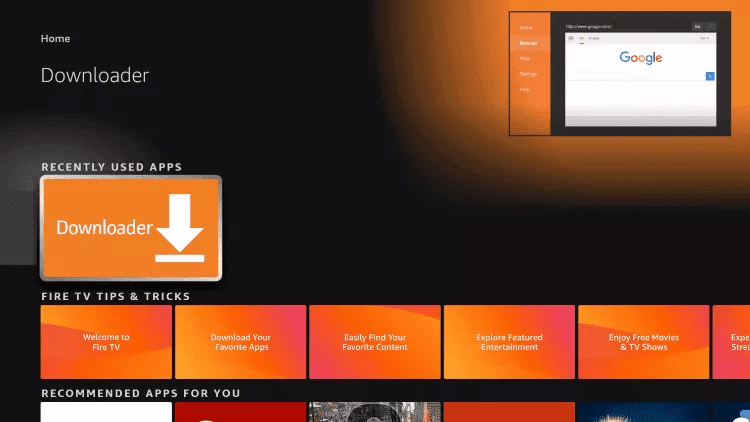
Go to the Firestick home screen, hit the search icon, and type "Downloader." It's a free app from the Amazon Appstore, orange icon, made by AFTVnews. Install it. This is how you'll grab the King IPTV app since it's not listed in the official store.
Step 3: Get the King IPTV App
Open Downloader, tap the URL bar, and type in the King IPTV app download link. You'll find the current download URL on their official website after you purchase or start your trial. Once you type in the URL and hit Go, Downloader will pull the APK file and prompt you to install it like IPTV Smarters Pro or TiviMate. Hit Install, wait about 30 seconds, and you're done.
Step 4: Log In with Your Credentials
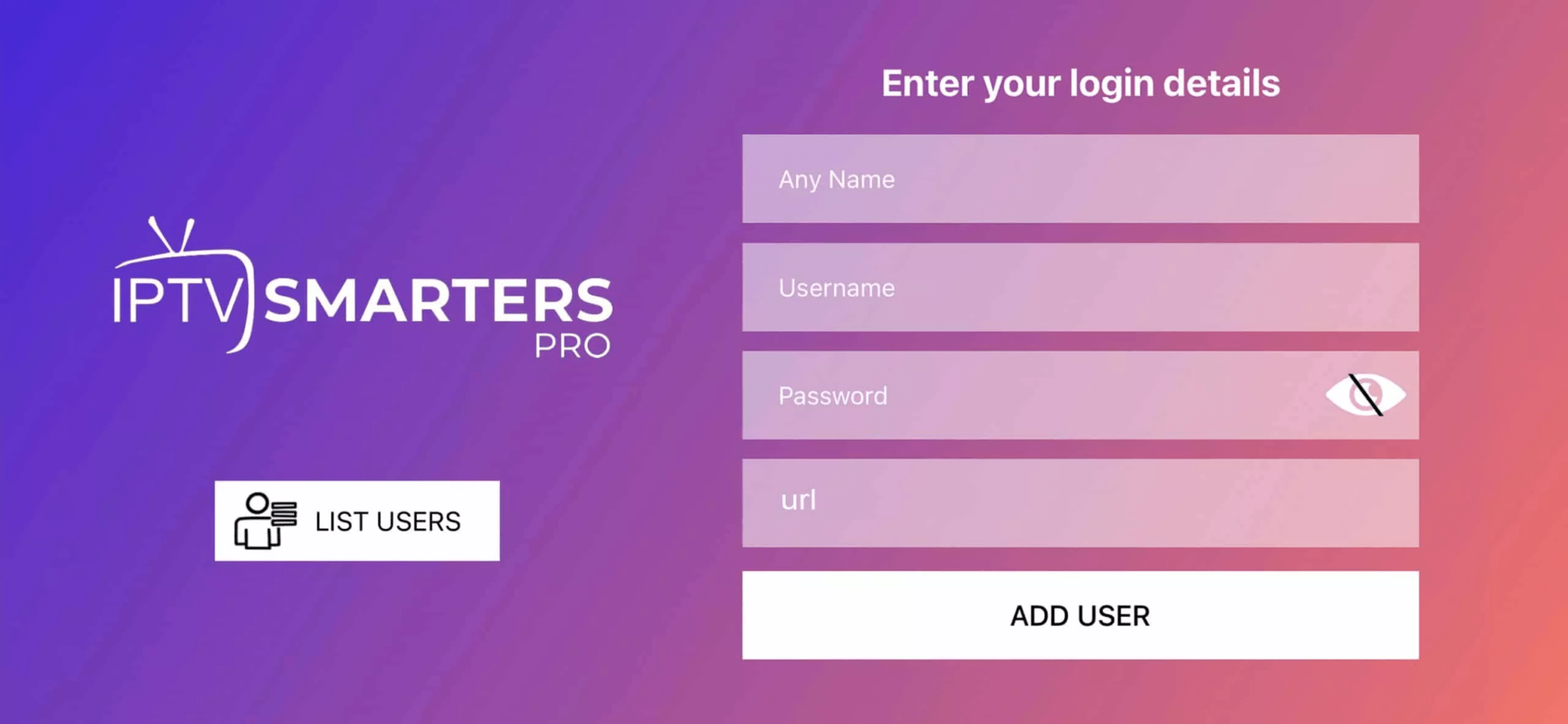
After purchase, King IPTV emails you a username and password (and sometimes an M3U link depending on your plan). Open the app, enter those credentials on the login screen, and you're in.
Step 5: Optional but Recommended — Install TiviMate
The default King IPTV app works, but TiviMate is a significantly better IPTV player. Repeat the Downloader process with the TiviMate APK, then inside TiviMate, go to Add Playlist → Xtream Codes API and enter your King IPTV server URL, username, and password (all provided in your welcome email). TiviMate gives you a better EPG, catch-up TV support, and a much cleaner channel browsing experience.
Step 6: Connect Your VPN First

Before you start streaming, get your VPN running. Install your VPN app (NordVPN and ExpressVPN both have native Firestick apps in the Amazon Appstore), connect to a US server, then open King IPTV. This protects your activity from your ISP and reduces the chance of throttling during live sports.
That's genuinely it. If you hit any snags, usually it's a wrong URL or a credential typo, King IPTV's WhatsApp support is fast and will sort you out quickly.
Final Verdict: King IPTV Review
Look, I started this whole experiment because a $180 cable bill felt like highway robbery. And honestly? After testing King IPTV for a full week across multiple devices, running it through live sports, late-night movie binges, and everything in between, I get why it's generating so much buzz.
For $17 to $22 a month, you're getting a channel lineup that puts traditional cable to shame, a VOD library that rivals standalone streaming services, and enough device flexibility to cover a whole household. The setup on Fire TV Stick is genuinely easy. The support is responsive. And the streaming quality, on a decent internet connection, is legitimately impressive.
Is it perfect? No. The legal gray area is real, and you should go in understanding that. Peak-hour performance during massive live events can wobble. A handful of niche channels will be offline at any given time. These are real tradeoffs, not dealbreakers for most people, but worth knowing upfront rather than being surprised later.
If you're a US cord-cutter who's tired of paying cable prices for a fraction of the content, King IPTV is absolutely worth trying. Start with the $2 trial, grab a VPN, set it up on your Firestick following the steps above, and spend a weekend with it. Worst case you're out two bucks. Best case, you cancel a streaming subscription you've been meaning to ditch anyway.
That's exactly what happened to me. And honestly, I haven't looked back.
Frequently Asked Questions About King IPTV
Is King IPTV legal in the United States?
Using an IPTV service itself isn't illegal, it's just streaming over the internet. The gray area comes from whether the content being streamed is properly licensed. King IPTV doesn't publicly list its licensing agreements, which means some content (particularly live sports and premium channels) may not be fully authorized. Using a VPN is strongly recommended to protect your privacy and avoid ISP throttling or scrutiny.
What internet speed do I need for King IPTV?
For standard HD streaming, you want at least 25 Mbps. If you're watching 4K content or running multiple streams simultaneously in the same household, aim for 50 Mbps or higher. A wired ethernet connection will always outperform Wi-Fi for IPTV, if you're getting buffering, that's the first thing to try fixing.
Does King IPTV work on iPhone or iPad?
Yes. King IPTV supports iOS devices, though the setup is slightly different since Apple restricts app sideloading. You'll typically use an IPTV player app from the App Store, IPTV Smarters Pro is the most popular option for iOS, and then connect it using your King IPTV M3U link or Xtream Codes credentials.
Can I use King IPTV on multiple TVs at the same time?
Yes, with the right plan. The base single-device plan only allows one stream at a time. If you want to run it on two or more devices simultaneously, you'll need to upgrade to a multi-connection plan. King IPTV offers up to 5 connections on their higher-tier plans, useful for families or if you want it running on your TV, phone, and tablet at the same time.
Does King IPTV have a free trial?
Not a completely free one. They offer a 24-hour trial for $2, which is about as low-risk as it gets without being literally free. It's enough time to test the channel quality, streaming performance, and app usability on your specific device and internet connection. If you're on the fence, the $2 trial is the right move before committing to a monthly or annual plan.
What happens if a channel goes down?
For major channels, outages are rare and usually brief, King IPTV typically resolves them within a few hours. For niche or regional channels, downtime can be more frequent. If you hit an outage on a channel you need, the fastest fix is contacting support via WhatsApp. They're responsive and can usually push a fix or point you to an alternative stream for the same channel.
Does King IPTV carry local US channels?
Yes, and this is one of its strengths over some competitors. You'll find ABC, NBC, CBS, and Fox affiliates for major US markets. Coverage can vary depending on your region, so it's worth checking during the trial whether your specific local market is included.
Is a VPN required to use King IPTV?
Technically no, the service works without one. But it's strongly recommended for two reasons: it protects your privacy from your ISP seeing what you're streaming, and it helps prevent throttling that some ISPs apply to IPTV traffic. A VPN also adds a layer of security if you're concerned about the legal gray area around unlicensed content.
Legal Disclaimer: Always ensure to use IPTV services by local regulations and copyright laws. Respecting intellectual property rights is essential. Before subscribing, make sure to confirm the legitimacy of the service. We are not responsible for any of these subscriptions or any choices you make; this review is for informational purposes only.